Author: austinlballard

I'm an editor trying to find a way to develop my talents and make money doing what I love.

A friendly robot next to a laptop and a writer

How to Use AI to Write Healthcare Security Policies (and When Not To)

A technical guide for healthcare organizations balancing the use of AI in documentation. This article was not generated by AI, but AI was used in helping to outline it and expound upon terminology.

Artificial intelligence like ChatGPT is affecting just about every aspect of business operations today. AI is a wonderful tool, but it’s critical to use it like a tool instead of depending on it completely to create content and write policies. This is especially true for the healthcare industry, which deals with sensitive data, HIPAA requirements, and the need for precise documentation.

Security policies in particular need to be carefully drafted with a human eye, but AI can make this process more efficient when used carefully. This article will explain how you can use AI to support the drafting of security policies in a healthcare setting, and what aspects of the drafting and review process should be left to human supervision instead.

Understanding the Role of Security Policies in Healthcare

Security policies are sets of documented rules, guidelines, and procedures that inform members of an organization how to protect data and resources. Policies outline expectations for user behavior, data handling, incident response and containment, and overall security measures. Essentially, they are plans to help prevent security incidents from happening.

In the healthcare industry, it’s crucial for organizations to keep sensitive patient information private and protected. To stay compliant with HIPAA, you should have clear security policies based on your organization’s members and their various roles.

Below are some common types of security policies:

  • Access control. This defines who can access specific resources within an organization and what they can do with those resources. This includes establishing who can access sensitive information, systems, and physical locations.
  • Data encryption. This type of policy dictates when and what type of data should be encrypted to protect its confidentiality. A data encryption policy ensures HIPAA compliance and determines the differing levels of data sensitivity and the types of encryption for each.
  • Incident response. In the unfortunate event that a security incident does occur, an incident response policy can help contain the issue and mitigate damage to reputation and assets. Communication plans can be outlined in the policy to specify how information will be shared internally and externally during an incident, including who needs to be informed and when.
  • Device management. Every organization and the individuals who are part of it use devices like smartphones, laptops, and tablets. This policy provides a framework for using the devices securely, keeping them updated, outlining password requirements, and accessing business networks responsibly.
  • Training and awareness. It’s essential to educate employees about security-related topics, like security risks, compliance, how to respond to phishing attempts, and reputation management. This policy describes how such training will be given, how often, and the consequences of non-compliance with the policy.

Where AI Can Help

AI tends to work well for basic or foundational writing, and that’s why it’s a great tool for drafting policy templates. Letting AI outline your policies saves you the time of having to “reinvent the wheel” of a tried-and-true policy structure. The specific needs of your organization can be added in as needed, and nuanced details can be modified later.

AI tools like Grammarly can be used to standardize the language of your policies. If your style guide uses specific terminology or requires a particular tone throughout your content, AI tools can point out issues with it and help you preserve consistency.

Regulations and compliance are extremely important in the healthcare industry, and AI can help automate compliance mapping and align your content with regulatory frameworks. You can use AI models to help you check all your policies to satisfy the requirements of HIPAA, NIST, HITECH, or whatever applies to your organization.

Ensuring compliance and covering the legal aspects of your policies is critical, but it’s also important to make the policies clear and understandable to all levels of understanding in your organization. Under your supervision, AI tools can summarize technical text and condense it into actionable policy sections. This way, the technical aspects of your policies are in place, and your organization’s members are clear on how to follow them.

Risks and Limitations of AI in Policy Writing

Like all tools, AI cannot perfectly replace human judgment and oversight. There are some lacking attributes of AI that need to be understood while outlining and refining policies:

  • Contextual misunderstanding. AI can get you started outlining the general aspects of policies, but it lacks full knowledge of your unique organization’s infrastructure and workflows. It’s essential for policies to be reviewed by humans who fully understand the context of the policies and the organization’s specific needs surrounding them.
  • Inaccurate or non-compliant output. Despite AI’s knowledge of laws like HIPAA and HITECH, it may not fully satisfy the laws when mapping them out in the policies. Legal language is something that should be double- and triple-checked to make sure that no compliance requirement goes overlooked.
  • Data privacy concerns. Any data you feed into AI models has the risk of being retained, memorized, trained with, and leaked through a future prompt. Use AI to tailor the language of your policies, but never give it sensitive details, protected information, or proprietary data.
  • Lack of authority and accountability. Security policies aren’t just informational—they are enforceable rules. These policies should reflect the organizational leadership’s own risk tolerance and ethical standards, and AI cannot and should not make decisions that could leave your organization liable. The policy writer—not the AI model—is accountable for any contradiction or vague language left in a policy.

A human should carefully oversee the compliance standards, clarity, and legal security of policies at every step of their drafting process. Ultimately, there is no accountability trail for an AI model. The fine details of a policy belong fully to the security teams of the organization who approved it.

When Not to Use AI

AI models make the process of drafting policies much more efficient, but they should be set aside completely when the policies are ready for approval, publication, and release to the organization as official materials. Always require a strict and thorough review from security and legal teams before signing off on them.

You should also refrain from using AI models for unique or sensitive policies. AI simply does not have the nuanced contextual understanding required for sensitive edge cases or organization-specific scenarios. In healthcare security documentation, this is a critical limitation, especially with healthcare’s unique needs related to ethical considerations, legal obligations, and risk assessments. An AI model may generate a policy that sounds reasonable but misses crucial details like state laws and regulations or the unique standards of the establishment. If an aspect of a policy covers a high-risk scenario, it’s best to be fully written by a human.

Another situation AI should have no part of is real-time crisis or incident response documents. The sensitivity and risk of these situations is something that requires a human touch, both internally and externally. AI models do not have the judgment and contextual awareness needed for dealing with incidents, and your organization could suffer reputation damage if your public statements addressing a crisis sound insensitive or robotic.

Best Practices for Using AI Safely

Due to their nature as large language models, AI models focus on patterns over factual accuracy, and they can sometimes hallucinate completely false information. When it comes to creating security policies for your healthcare organization, following these best practices will help you get the most out of AI without compromising on compliance or safety:

  1. Use AI for first drafts, not final versions.
  2. Combine with human subject matter experts, especially on sensitive policies.
  3. Use on-premises or private AI models when possible to limit spread of information.
  4. Maintain version control and audit trails for each policy.
  5. Conduct periodic manual reviews and updates as needed.

Conclusion

AI can be a powerful tool for accelerating the creation of security policies, especially when used to draft templates and ensure consistency. But in the healthcare industry, where privacy, compliance, and patient trust are essential, AI models should be used with caution. AI cannot replace human judgment or contextual understanding, and it cannot be held accountable for mistakes. If you use AI as a tool and not a substitute, you can write efficient, trustworthy policies for your organization that can keep your members informed and your information protected.
Fixing (or at Least Improving) the Crafting Systems in D&D 5e

This article was first posted on Pretzel Lectern. It has been updated slightly to fit WordPress.

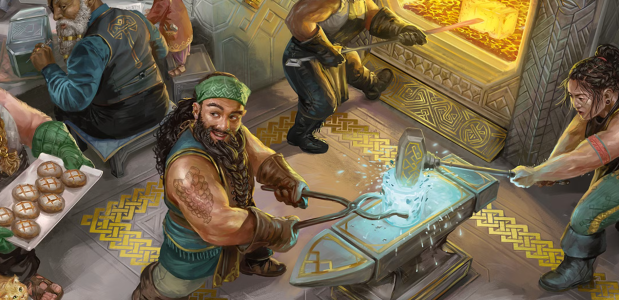
So you have a good idea for a magic item for your character. You approach your Dungeon Master about it, who flips through the downtime options in Dungeon Master’s Guide and Xanathar’s Guide to Everything and gives you guidelines on how to get started. The problem is, if you follow those rules exactly, you’ll run into problems like the following:

  • An arrow +2 will cost 1,000 gp, and an arrow +3 will cost 10,000 gp.
  • Uncommon potions of healing cost TWICE as much to craft as simply buying them (which I seriously think is an error), based on the Adventurer’s League prices.
  • A Legendary single-use spell scroll (9th level) costs TWO AND A HALF TIMES as much to make as a Legendary item that has permanent enchantments.
  • It can take you anywhere from half a year to FIVE YEARS to craft a Very Rare item that you could find much earlier while just leveling up and adventuring during that same time period.

Luckily, Xanathar’s Guide makes crafting a lot more viable, but the system still suffers from too broad of rarity ranges, a lack of specific rules for magic item attributes, and just a general lack of fun. I get that 5e’s primary quality is simplicity and being streamlined, but if a player wants to craft a magic item, some complexity is required to make a balanced system. You can’t just abstract everything about the process.

Making crafting too easy breaks the game and cheapens magic items; however, making crafting too hard discourages it from ever happening, which is a shame. How can we make a crafting system that is closely based on the existing rules, but fixes rarity ranges, ensures balance and viability, and gives balanced, reverse-engineerable rules for giving magic items attributes? Below is my suggested solution.

Item Rarity

The main thing we need to understand, and what a lot of the problems revolve around, is 5e’s rarity system. Magic items range from Common to Legendary, and the range has some problems, particularly within the “Very Rare” rarity level. This is the level where the cost range is 5,000–50,000 gp, and the power of the items ranges from arrows +3 to flying carpets and swords that can lop creatures’ limbs off. One of the first ways to fix the crafting system is to separate this Very Rare rarity into two: Very Rare and Epic. Epic rarity will split the rarity in half, allowing for a smaller range of gold and time to work with. For the purposes of this classification, Epic magic items cost between 20,000–50,000 gp, and Very Rare magic items range from 5,000–20,000. Categorizing existing Very Rare magic items into these categories will have to be done by intuition—obviously a weapon +3 would be Very Rare and a dwarven thrower, which has a +3 bonus in addition to other properties, would be Epic.

Magic Item Design

The next thing we need to know are the guidelines in the DMG for Dungeon Masters to create magic items. Here are the tips they give:

  • +1 bonuses are Uncommon, +2 bonuses are Rare, and +3 bonuses are Very Rare. 
  • Uncommon items are for up to 4th-level characters. Rares are for up to 10th. Very Rares are up to 16th. Legendaries are 17th and higher. 
  • Items have a maximum spell level based on their rarity.
  • Items have a maximum bonus based on their rarity
  • Items that do NOT require attunement should not have lasting benefits and should not grant a bonus that other items also grant, to avoid stacking.

This is an okay start, but we’re missing a lot of information here: How rare is granting resistance? Why is a longsword +1 Uncommon but half plate +1 Rare? What if an item can cost its maximum spell level at will instead of once per dawn? An easier way to determine an item’s rarity is to look first at the item’s cost range and then at the rarity. By assigning gp values to different attributes, we can make a system for determining rarity much more simply.

Also, it’s worth considering the DMG‘s rules for custom spells here as well, at least in terms of damage. A 1st-level spell deals about 2d10 damage, or 2d6 damage to a group, a 3rd-level spell deals about 5d10 damage, and so forth.

Lastly, it’s also good to keep in mind existing class features. Simply look at the level of the class the feature is gained at and use that as a guideline (see the second bullet point up above).

Magic Item Cost and Time

I’m just going to throw the DMG rules for crafting right into the garbage here, because if you look at them and do the math, a magic item of Legendary rarity takes fifty-four years to craft. Xanathar’s Guide is much more reasonable by prescribing a time and a cost that each rarity of item takes, instead of just saying “25 gp per day toward the total cost.”

However, I think we can do better. I think we can split up the magic item costs within their respective rarities even more by looking more closely at the spell level. Consider Rare items. They encompass items that have a spell level of 4th to 6th, yet by Xanathar’s rules, all of them only cost 2,000 gp and take about two and a half months to craft. That’s quite the jump (5x) from a mere two weeks for an Uncommon item, and the next jump (2x) to Very Rare is a half a year’s worth of crafting time and ten times the cost. I’m all for exponential growth in cost, but not this drastic. The CR range of the magic item ingredient is also a bit too wide for my taste.

By organizing price by spell level and crafting time dividing the cost by a rarity standard, we split Uncommon items into two cost tiers and Rare items into three cost tiers. And if we say our new Epic rarity of magic items goes up to 8th level and Very Rare goes up to 7th level, we’ve got a much more evenly distributed range for our magic items to be crafted.

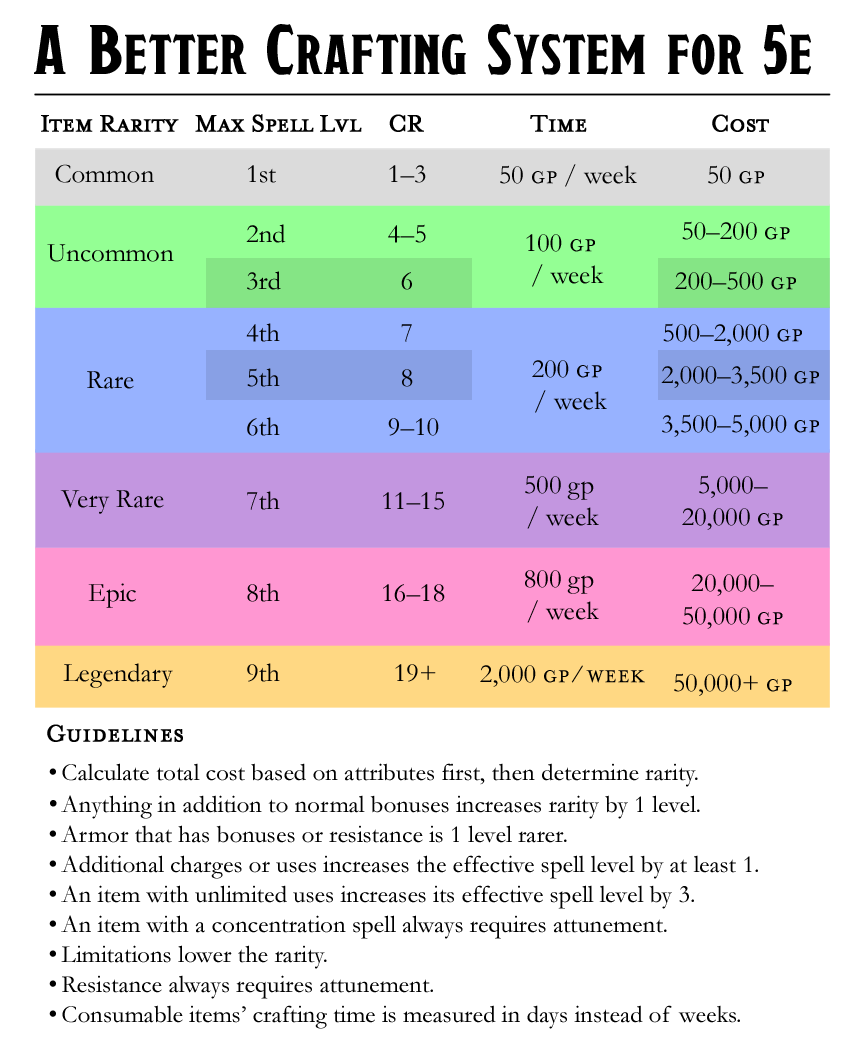
With those changes and with a more even distribution of the CR range for ingredients (or as I like to call them, reagents), the table looks more complex, but it will give us a much more reasonable set of rules to work with:

Magic Item RarityMax Spell LevelReagent CRTimeCost
Common1st1–350 gp / week50 gp
Uncommon3rd4–6100 gp / week200–400 gp
Rare6th7–10200 gp / week500–5,000 gp
Very Rare7th11–15500 gp / week5,000–20,000 gp
Epic8th16–18800 gp / week20k–40k gp
Legendary9th19+2,000 gp / week50k+ gp

There’s still wide range of prices between Very Rare and Epic items, which causes a weird disconnect in the time range, and Legendary items don’t have a cap on cost, but if we focus more on that cost value than on the rarity itself, it probably doesn’t matter much. You simply divide the total value by the time, and you’ll get a crafting time that’s reasonably close to that in Xanathar’s Guide. And DMs can use their best judgment when making items whose prices are close to a threshold. This is also a more useful table for determining the gold value of existing magic items in the game.

In summary, Common items take 1 week to craft, Uncommon items take 2–4 weeks. Rare items take 5–15 weeks. Very Rare items take 10–25 weeks. Epic items take 25–60 weeks. Legendary items take at least a year to craft. And remember that the cost (and therefore time) of all consumable items is halved, but I’m fine with even quartering the cost of ammunition items just to make them more worth crafting; a single arrow that costs a month’s wages of a modest lifestyle and loses its power after a single hit is pretty steep. Make sure to note the reagent CR of a consumable item’s original rarity before you calculate the cost, since the cost reduction will seem to reduce its rarity in the table above.

Now all we need to do is figure out how to distribute the cost when crafting a custom magic item.

Magic Item Attributes

Okay, now that we have our new table set up, let’s determine some basic attribute rules for item customization. I want to keep this as simple as possible, since the table is already upping the complexity of our 5e game quite a bit as it is, so let’s see if we can use the existing magic items in the DMG as examples we can reverse-engineer. This won’t be a perfect process no matter what we do, but my goal here is to just give a resource that will help DMs get as close as possible to a balanced item without having to just take a wild guess.

Looking at the existing magic items, it’s easy to see some patterns. For example, armor is one step rarer than weapons and other items with numeric bonuses. It’s almost a universal rule that resistance requires attunement and is at least of Rare rarity. It’s also rarer to find items that have charges than it is for an item that can only be used once per dawn, and even the maximum spell level isn’t always a hard and fast rule, since spells that affect multiple targets seem to be rarer.

After some research and trial and error, I’ve come up with the following basic rules to follow when determining a custom item, based on a specific spell or effect, or modifying/upgrading an existing item:

  • Anything in addition to normal bonuses makes the item one level rarer.
  • Armor is one level rarer when it has bonuses or resistance.
  • Additional charges or uses increase the effective spell level by at least 1.
  • An item with unlimited uses has its effective spell level increased by 3.
  • An item with a concentration spell always requires attunement.
  • Limitations lower the rarity.
  • Resistance always requires attunement.

There are, of course, other things to keep in mind, such as different types of damage that are more commonly resisted and whatnot, but these keep it simple enough for a starting point. Also, keep in mind that the rarer the item, the less dependable all of these rules are. Epic and Legendary items may require more fine-tuning than others depending on their complexity. The best thing to do is just compare it to similar items and mechanics in the game and hope for the best. And if possible, test.

Let’s put these rules to use with a handful of magic items from the DMG. Ones that follow the rules easily, like weapons +2, are self-explanatory. Let’s go with the dragon slayer, staff of healing, cap of water breathing, potion of flying, ring of telekinesis, and the Ollamh harp.

Dragon Slayer

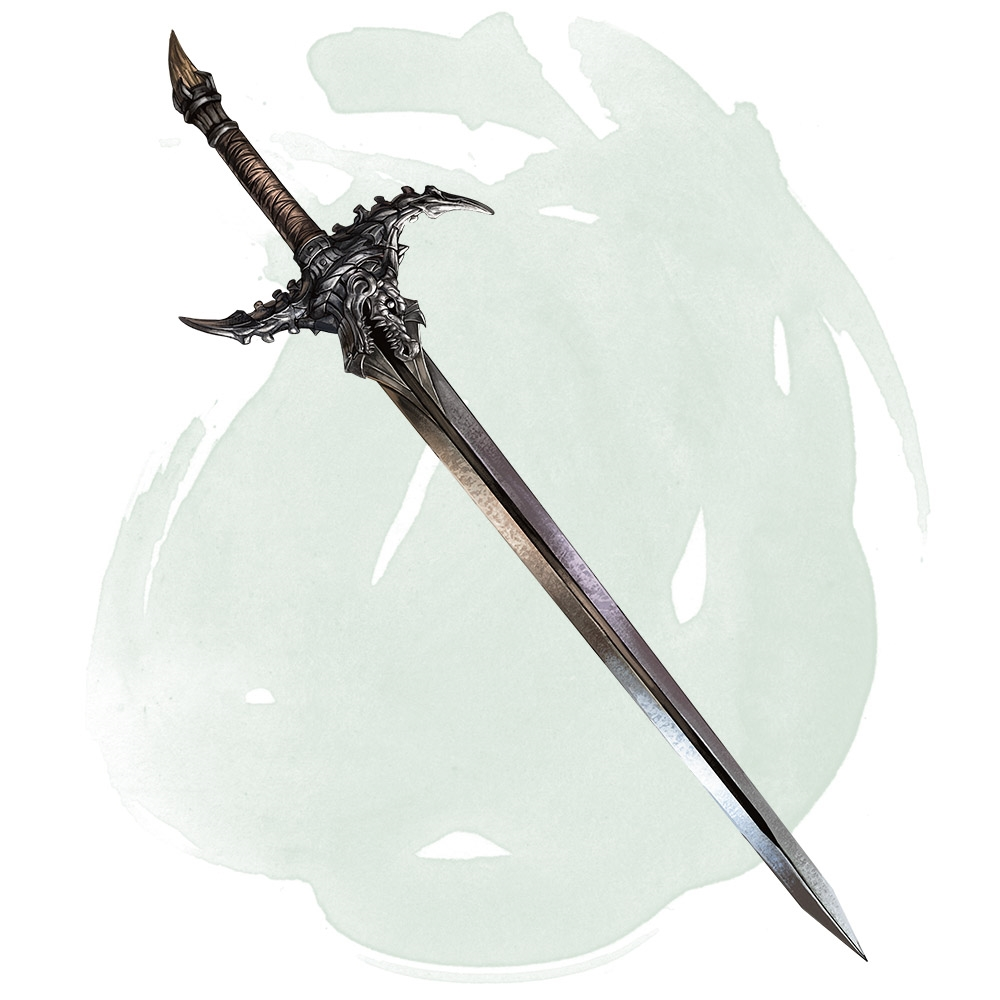
Let’s start with an easy one. An Uncommon weapon grants a +1 bonus to attack and damage rolls, which the dragon slayer does, but since it also deals an additional 3d6 damage to dragons, the rarity is bumped up to rare. Since 3d6 is roughly the damage of a 2nd-level spell, but since it’s limited only to dragons, I’d say adding 1 to the spell level of the item would make a dragon slayer cost 1,000 gp and take 5 weeks to craft. A Rare magic weapon with no attunement cost. Perfect.

Staff of Healing

Let’s see if this staff fits my criteria. It has 10 charges, for starters, and the highest spell it can cast is mass cure wounds. That’s 5th level, so it can cast it twice, or cure wounds up to 4th level (so 2–10 times), or lesser restoration 5 times. It’s pretty dang good for a Rare magic item, but it does require attunement, and if you use it too much and are unlucky, you won’t be able to use it every day, and may even lose it forever. It’s toward the higher end of Rare items, so I’d definitely say 4,000 or 5,000, but it fits pretty well there.

Cap of Water Breathing

Water breathing is a 3rd-level spell, but casting it at that level allows you to affect up to 10 people with it, so only affecting the person who’s wearing the cap lowers its effective spell level by a bit. It can be used at will, but water breathing has a duration of 24 hours, so that’s not a huge stretch of its power anyway. I think this fits as a 200-gp Uncommon magic item just fine.

Potion of Flying

Let’s try a consumable item and see if my formula still works: A potion of flying seems to start with the fly spell, which is 3rd level, but there are a couple of important differences: fly grants a flying speed of 60 feet, it lasts 10 minutes, and it requires concentration. This potion only grants a flying speed “equal to your walking speed” (so probably only 30 feet); but it lasts for a whole hour, it does not require concentration, and you can hover, meaning you can’t be knocked prone out of the sky while under its effects. I’d increase the effective spell level by 2 for the lack of concentration alone, and another 2 levels for the hour-long duration. I think the hover benefit and the lower speed drawback cancel each other out, leaving us comfortably at the lower end of Very Rare rarity.

Cutting the cost in half brings the price of a potion of flying to 2,500 gp. If we applied the normal time duration to this, even using its effective Very Rare rate on its Rare price, it would take over a month to brew a single potion. That seems like a ripoff. I’m all for being much more lenient with consumable items—No matter how good they are, you use them once and they’re gone forever. So I vote that consumable items’ crafting time should be measured in days instead of weeks. Five days to brew a potion of flying sounds perfectly reasonable to me. You still have to spend a fair amount of gold and hunt down a Very Rare reagent (like a roc feather) to brew it, and it seems different from permanent magic items where a player might enjoy looking forward to making progress on it over time.

Ring of Telekinesis

Alright, since we’re dealing with a Very Rare or Epic item this time, let’s start out a bit simpler. A ring that lets you cast the telekinesis spell at will. By our rules, that would mean a 5th-level spell raised to an 8th-level spell since it has an unlimited number of uses. That does fit as an Epic item, but it’s very important to take limitations into account: The ring’s description says “but you can target only objects that aren’t being worn or carried.” That lowers its power considerably since you can’t affect creatures with it, so I’d say that lowers the spell level by 1. That makes it fit as a Very Rare item. 

Since Very Rare has a reagent CR of 11–15, I’d say a beholder (CR 13) would have a good reagent since once of its eye rays is telekinetic. That puts it right in the middle of the Very Rare price range at 10,000 gp. I’m not sure why, but my DM gut says I’d probably bump it down just a bit more though, to 8,000 or so, because not being able to target creatures is a big knock down. Still within the rarity, and I’m all for going with your gut in cases like this. These are only guidelines, after all!

Ollamh Harp

Okay, now let’s go a bit more complex and check out a Legendary magic item. The Ollamh harp can cast fire storm and control weather once each a day, 7th- and 8th-level spells already, and it also lets you cast five other lower-level spells once per day, and it gives disadvantage on all spell saves against being charmed by a spell cast through the harp, even if it’s just being used as a spellcasting focus. Even though this item is limited to bards, it’s still high enough in power with all of those powerful spells that it still fits in the Legendary rarity. I’d say a solid 60,000 gp cost, and 14 months of crafting time, would be fair for the harp.


These were chosen at random out of the hundreds of magic items in the game so far, so I’m sure there are some outliers (like the vicious weapon, which is Rare despite only dealing an extra 7 damage on a roll of 20 with the weapon, or the coiling grasp tattoo, which should be a lot rarer than an Uncommon if it allows you to deal 3d6 force damage and auto-grapple at will. Seriously); however, this was a fun exercise in any case, and I really think this should help the process of crafting magic items be more accessible and fair to DMs.

After fiddling with a few more items, here’s a cheat sheet you can download for your own use of this system. Also, check out this post for some more items I ran through it with fairly consistent success!

Code and Copy: A Young Editor’s Search for a Fulfilling Career

A sample third-person news article about my own search for a job.

When Austin Ballard got laid off from his software development job in February 2024, his first impulse was one of worry and dejection. His despair soon turned to hope and a renewed confidence, however, as he realized that this hardship could be just what he needed to break out of his professional rut and step firmly onto his dream career path.

Although Austin has enjoyed computers and basic coding logic since he was a teenager, becoming a software developer was not his first choice for employment. His true passion and talents were always in English and the desire to bring order to chaos.

Educational Exploration

Austin began his schooling at Brigham Young University–Idaho in 2010, where he declared an English major with an emphasis in creative writing. He had left high school with the dream of becoming a book editor, and he enjoyed writing stories as well, so he thought that it was a perfect fit. However, he soon realized that what a college calls an “English course” is very different from what he was used to in high school. “They really should call the English major ‘English Literature,'” he says. “I was expecting to learn about grammar and usage, but all I did was read old stories and be asked to prove whether they were good or not.” Austin found some enjoyment and experience editing as an English teacher’s aide and a writing tutor at BYU-Idaho’s writing center. However, after a year and a half of trying to make his academic courses work out, Austin had to accept that he had no future as a creative writer. What he really enjoyed was not poetry and prose, but language itself.

Austin transferred to BYU-Idaho’s sister school, BYU-Provo, to declare a Linguistics major. He was fortunate to easily get a job at BYU’s writing center, as the then-recent change in missionary age for the university’s owner, the Church of Jesus Christ of Latter-day Saints, had left it understaffed. With on-the-job experience and a new major, Austin felt confident about his new educational path and his prospects for the future; however, although he enjoyed his courses in Phonetics and the History of the English Language, one of his classes made him realize that his educational exploration may not have been over quite yet.

“I had never hated a college course in my life more than Theoretical Syntax,” he says. “It was all about what might be ‘theoretically’ possible to develop in human languages.” Austin describes himself as a very practical person, and Noam Chomsky’s theories in syntactic linguistics went right over Austin’s head in terms of usefulness. He described the lessons the professor taught as similar to “listening to someone try and explain the rules to an overly complex board game that they had just made up in their head.”

While his English major had been too far on the artistic side of literature, Austin now found himself too far to the other side of the spectrum in a major that was too scientific. He soon redeclared his major to English Language and declared a minor in Editing, finally reaching a balance between the two. For the rest of his college career, he was able to hone his editing talents, focusing on subjects like usage, semantics, grammar, and design.

Early Editing and Content Jobs

Austin was able to regularly use his English language knowledge in his job tutoring hundreds of students at the BYU Writing Center. He was also able to use his creative talents and enthusiasm for projects to design educational writing handouts, a weekly morale-boosting newsletter for his fellow tutors, and two video commercials that advertised the Writing Center’s services. “I’ve always loved projects, at work or in my free time,” Austin comments. “I love looking at something and thinking, ‘Can I make something like that myself?’ and then working on every detail to get it just right.” In the case of the promotional videos, Austin took upon himself many responsibilities to create them from start to finish, including writing the script, casting, directing and recording the narration lines, filming, sound mixing, and adding effects using Adobe Premiere. “One of the videos was a cheesy infomercial I based on one that I had fallen for, and the other was one of those hand-sketched videos that was really popular in the mid-2010s.”

As the spring semester ended, Austin applied to BYU’s on-campus publishing house, the Religious Studies Center (RSC) and was fortunate enough to get an offer for the job. Austin enjoyed finally putting his editing skills to use, and he was promoted to team lead after a year. Besides editing books, Austin also contributed to the Portuguese language translation of the RSC’s website and got to work one-on-one on a historical research project with religious historian William G. Hartley.

After graduating in June of 2014, Austin was hired at a local SEO marketing company called Boostability. It was around this time that he used his newly developed publishing skills to create a novel, which he wrote with his cousin, edited, typeset, designed a cover for, and self-published on Amazon.

Rather than producing long-form projects that took time to carefully polish and develop for publication, the editing department at Boostability (nicknamed “Boost” by its employees) was a fast-paced environment. Austin was assigned to edit a queue of many 300–500-word guest blogs each day written by freelance authors and optimized for SEO-building keywords. Austin took his work seriously and soon became one of the most efficient editors in the team. On days with an exceptionally large queue, the managers would periodically schedule “dashes,” offering gift cards to whomever could edit the most blogs within a 1- or 2-hour period. Austin was the primary winner of such dashes. “I was just so excited to be good at something,” says Austin. “I would turn off my headphones, get fully in the editing zone, and just crank through them at full speed.”

Austin’s skills were tested to their limit in 2015 when the queue became particularly large right before the holidays. In order to get through the hundreds of articles before Christmas break, the managers offered a bonus of $250 to every editor in the department if the queue was cleared before the end of the year. Austin’s breakneck editing speed was instrumental in clearing the queue, and his efforts won him the $250 as well as the Employee of the Month Award. “I edited upwards of 70 articles a day,” Austin says. “Roughly twice what everyone else was getting done. I even ended up with a repetitive use injury on my arm because of all the typing.”

For all his speed and efficiency, Austin didn’t sacrifice quality for the quantity of his work. Austin got regular praise for his precision and eye for detail when editing the guest articles. However, Austin’s efficient methods did not translate well in the company’s productivity metrics. He also became disillusioned with the company when a new hire was promoted over him purely because of her educational background. He relates, “I started to wonder, ‘What am I even working towards?’ If tenure doesn’t matter and results don’t matter, what’s stopping others with more educational background than me from getting promoted over me every time?”

Austin learned of a marketing project manager job at Boost, which came with additional responsibilities as well as a bonus structure that rewarded employees for harder work and stronger results. Austin got the job and immediately enjoyed the change of pace. Rather than editing blogs all day every day, his responsibilities varied throughout the week and included coming up with blog titles, assigning them to freelance writers, editing them, and then reaching out online to get them posted as guest articles on blogs. He enjoyed the organizational and project management aspect of the position, which involved managing several workflows at once as the guest articles went through various stages of development. He also enjoyed working on a smaller team and the easier camaraderie that came with it.

Although he was new to the team, Austin soon learned that creating a macro on Microsoft Word to fix common mistakes cut down the established editing process by 80%. This allowed him to publish more blogs and regularly get the highest tier of bonus money. However, the downside to this focus on quantity was that it depended on the amount of work Boost had available, and it soon dwindled. The workload became so low that at one point Austin says he was working for less than an hour a day. “You know that part on the film Office Space where Peter says he only did about 15 minutes of real actual work per day? I ran out of things to do quickly, and because it was an hourly job, I had to just sit at my cubicle and get paid to twiddle my thumbs.”

With fewer and fewer clients to write articles for, it became impossible to reach even the lower tiers of the bonus structure, and Austin realized his ability to sustain his family financially was rapidly declining. He reached out to other publishing houses and content companies seeking work, but by 2017, Austin came to a difficult conclusion: in order to feed his family, he had to give up editing.

The Reluctant Switch

Austin heard that there was a lot more money to be made in computer programming. He had always enjoyed coding and logic while using computers throughout his youth, so he enrolled in a local technical college called Mountainland Applied Technical College (MTECH) for a year-long web development certification course and internship. It was a long year of school and full-time work, but fortunately for Austin’s financial situation, in December 2018 his internship at Xactware became a full-time position, this time salaried instead of hourly.

Austin’s hard work had paid off. He could finally have a flexible schedule instead of being paid to be on the clock with an empty workload. “My kids had no idea what to do with me coming home at 4:30 every day,” Austin laughs. “They were so confused at seeing me come home before they were already in bed ready to be tucked in.” He comments.

Despite his internet application developer title and work duties, Austin found ways to use his editing and organizational skills to help out his team. When he found that the company wiki was outdated and in serious need of cleanup, Austin volunteered to clean it up: “My manager told me they had been wanting to update it for years, but that no one wanted to do it because it was tedious. I looked at him and said, ‘I love tedious!'” Austin also contributed to project documentation on the wiki, making it easier for new hires to jump into the existing projects and learn how to use them.

As 2019 ended, Xactware’s software development department was merged into another one, which changed the budget available for promotions. Only one promotion was available, and Xactware gave it to the developer with the most tenure: someone who had started working a month before Austin did. “It was just like at Boostability,” says Austin. “No care for results at all. [The other candidate] had even taken three months off for maternity leave, so I technically had more months of actual work experience. But someone higher up just looked at the list of employees and just said ‘Give [the promotion] to her; she’s been here the longest.'”

Austin was disillusioned by Xactware’s broken promises and once again felt like he was at a company with no future prospects. Austin and his wife decided that they needed a fresh start. Based on the cost of housing and other factors, they decided to move to Oklahoma. “That was toward the end of 2020, right in the middle of COVID,” says Austin, “and all the work turned remote. So that, at least, was perfect timing for a move.” Xactware was not registered to employ workers in Oklahoma, so in 2021, Austin accepted a fully remote software engineer position at a hospitality company called Sabre Corporation. With the new ease of working from anywhere, he made the move and settled in Oklahoma.

Although the work for Sabre Corporation was convenient, Austin had been hired under difficult circumstances at the company. It was experiencing growing pains from large number of developers and managers being hired in a small period of time, and the travel industry was suffering from the pandemic. “I had something like three or four different people I had to report to,” said Austin. “Sometimes I got conflicting instructions from two of them, and sometimes they didn’t even know what team I was on. Even the managers were just so new, and I had next to no onboarding.” After a year at Sabre and with no end to the confusion in sight, Austin turned to LinkedIn to seek a more stable job.

Luckily, Austin didn’t have to look long—The pandemic had opened many remote programming jobs online, along with many recruiters. One such recruiter found Austin a coding job with an office only a couple of miles away from Austin’s home: a software developer position at a legal company called TVC Pro-Driver. Although the position was a hybrid one, his team was largely remote, so Austin ended up spending most of his working time in his home office.

Despite Austin’s enthusiasm to be hired at a smaller company, it seemed that fate was destined to continue meddling in his career journey. The project Austin was hired for, an overhaul of the company’s member portal website coded in Angular, was continually put on hold as the company’s goals and priorities changed. In the meantime, Austin offered up his editing skills to TVC’s marketing team. They had been trying to set up a schedule for publishing content for their blog, and Austin turned out to be a good resource for setting up and streamlining their WordPress page. He was also instrumental in fixing several forms on the site that were coded incorrectly and were causing errors for users. “I was a good bridge between the coding and content side of their work,” he says.

A Foggy Future

Things seemed to look up for Austin in late 2023 when TVC Pro-Driver was acquired by Love’s Travel Stops. His benefits became much better, and after attending one Love’s onboarding meetings to welcome the new merged company, he felt like he was part of a company that valued its workers like family. However, a mere two months later, he was laid off. “It was sudden, but not surprising,” says Austin. “The project I was hired for in the first place never got off the ground, and the CEO even admitted that the position itself had probably been a mistake.”

Instead of looking for more development work, Austin decided that this was the perfect time to rebrand himself back to his editing origins and find a content-related job again. “I’m glad I could get the years of development experience,” he says, “but it’s clear to me that I had no future in the field. I want a job I’m good at and can grow in.” He also tries to keep an optimistic attitude about the past five years, hoping that his software engineering experience will make him more marketable and versatile as an editor, communications specialist, or technical writer.

Austin’s unemployment comes at a tough time. Despite hundreds of job applications, reaching out to hiring managers personally, repeatedly revamping his résumé, and asking for referrals from over 50 LinkedIn connections, Austin only got two interviews in the following 10 months of unemployment. Artificial intelligence-powered applicant tracking systems, as well as an estimated 36% or more job postings being fake, make the journey a discouraging slog. Aside from networking and applying daily to jobs, Austin strives to gain an edge in his job seeking process with a thoroughly decked-out LinkedIn page, an editing and writing portfolio website, and regular contact with tech recruiters.

More than anything else, this time spent unemployed has helped Austin reflect on what he values in a company and what all his experience has added up to over the years. “I just want to work,” Austin says. “I don’t have a lot of specialized experience, but my passion and drive to return to what I excel at have never been stronger. All I need is a chance, and I know I can be an indispensable asset to any company.” It’s been a long journey that as yet has no end, but Austin hopes to one day soon build the career he’s been looking for his entire life.

Austin is open to work in any industry as an editor or content project manager. You can contact Austin and see his full résumé of work experience on LinkedIn.

Understanding the Scope of the Warcraft III Object Editor

A sample training article for using the World Editor application from the PC game Warcraft III.

There haven’t been any updates—or even any official news—about Warcraft III since Blizzard released Warcraft III: Reforged back in 2020. After mixed reviews from critics and an overwhelmingly negative reception from players, Blizzard cut off all development of the game after only a few halfhearted patches and articles. However, as seen by recent projects like InsaneMonster’s Warcraft III Re-Reforged and LoreCraft’s Warcraft: Chronicles of the Second War, the game’s built-in World Editor application is a powerful tool that can make content that goes above and beyond anything Blizzard promised. This article will focus specifically on the vast utility of the Object Editor, where you can make whatever unit, ability, or item you want for your custom map.

Units

The most basic use of the Object Editor is to modify or create new units and buildings. The regular units will have their names in black, and modified ones will have purple names. Clicking on a unit will show a long list of values that you can change. For basic maps, you may only want to make a few uniquely named units or a spellcaster who has different abilities, but you can also change everything from a unit’s size and color to its combat statistics, sound set, resource cost, and speed.

Below are the categories the values fall under and how changing a value in a category can affect a unit or building:

  • Abilities. A unit’s abilities, whether passive, active, autocast, or hidden. Hero units have their own set of Hero Abilities that are learned from leveling up. Creating a unique ability set is a common way to set apart RPG maps from regular melee ones.
  • Art. Purely aesthetic elements of a model: the speed that a unit’s model plays its animations, button positions for training and buildings, tinting color, interface icon, and the scale of the model and its shadow.
  • Combat. Everything related to a unit’s statistics in a map, including its aggro range, attacks, attack range, projectile settings, armor, defense type, and the sounds their attacks and armor make.
  • Editor. A few values that mostly just make the unit easier to manage in the World Editor; for example, which tileset menu you might find a unit in.
  • Movement. A unit’s speed and movement type, determining what types of terrain a unit can move across. If a unit’s movement type is “fly” or “hover,” you can also designate how high above the ground the unit is floating.
  • Pathing. Mostly just for managing buildings, with specific pathing maps and requirements for where it can be built. For units, you can determine how much space a unit takes up, regardless of how big it appears.
  • Sound. Sound effects for the unit’s movement (such as galloping sounds for a mounted unit), construction sounds for buildings, and the full voice set for units.
  • Stats. A variety of statistics that determine the unit’s cost, hit points and mana, classification and race, stock for hired mercenaries, and attributes for hero units.
  • Techtree. A unit’s relationship to the structure of its team. This includes what buildings or units it can build or train, requirements for it to be trainable or buildable, and whether it has mercenaries or items to sell.
  • Text. The unit’s name that’s visible in game, editor names to make it easier and more distinguishable in the editor, proper names of hero units, and informational tooltips. There’s also a value to set a hotkey for training the unit. Make sure the hotkey is different from that of other units or buildings created from the same source.

Going through every value is beyond the scope of this article, but I recommend looking at the existing units in the game and their relationship with each other, and tinkering around with individual values that you might be curious about.

Items

Heroes in the game can manipulate items, and this menu allows you to modify existing items or create new ones for your campaigns.

  • Abilities. The primary function of the item and how it affects a hero who is holding or using it. Make sure to take into account everything about the ability you assign to an item, including whether the ability costs mana.
  • Art. The item’s button position when it is purchased in a shop, its icon, and its model. The icon is generally the most important aspect of an item, but powerups that will be consumed on use (and therefore not be seen in a hero’s inventory) may require a distinct model to be chosen.
  • Combat. For items, this only refers to Armor Type, which is the metallic or wooden sound that an item will make when a unit attacks it. It has no mechanical effect on the item.
  • Stats. The item’s cost, power level (as far as computer players are concerned), and stock options for shops that offer the item for sale. This is also where you can determine (alongside its Abilities value) whether the item is a powerup and is automatically used when picked up, an item that grants passive benefits, or an item you click on to cast an active ability with.
  • Techtree. Requirements for the item to be available for purchase, such as the higher-powered artifacts in player-owned shops that unlock when your main central building is upgraded.
  • Text. The item’s name, the hotkey used to buy it, and the tooltip that explains to the player what the item does. The Description value is similar to a tooltip, but often more brief, since it is seen on the item’s selection screen while it’s on the ground instead of in a shop or an inventory.

Items can be a great way to give new powers and add variety to the hero units in your custom maps. Later, we’ll discuss abilities and how item and unit abilities differ.

Destructibles and Doodads

“Doodads” is a term Blizzard has used since StarCraft (1998) to describe pieces of scenery and set dressing places on maps. This includes fountains, signposts, rocks, archways, torches, flames, and anything else you might use to make your map feel like an interesting world worth exploring. “Destructibles” are doodads that can be destroyed, which includes trees and destructible gates, as well as containers like crates, barrels, and cages.

  • Art. What the doodad looks like, including its size, color, shadow, models, and model variations. Since some destructibles can be selected in-game to see how many hit points they have (similar to a unit), things like Selection Size are options unique to their list of values.
  • Combat. The sound destructibles make as you attempt to destroy them (Armor Type), as well as the destructible’s classification for the purposes of targeting them with an ability.
  • Editor. Some options for making a doodad have random variations when placing them in the editor, which tileset the doodad is unique to, and where the doodad can be placed. Unlike units, whose scale value is fixed, doodads can have a minimum and maximum scale to add more variety to a group of them on the map.
  • Pathing. Similar to buildings, these values primarily determine how much space (if any) a doodad takes up to block the construction of buildings and movement of units.
  • Sound. An option for a doodad to have a looping sound whenever it’s on the screen, such as the crackling of a brazier’s flames. There’s also a setting for the sound a destructible makes when it is destroyed.
  • Stats. The hit points of a destructible. There are also some fields for repairing a damaged or demolished destructible, which is a somewhat underused but functional option in the game.
  • Text. The doodad’s name, as well as a suffix for setting it apart from similar doodads in the editor (for example, an archway set to a specific rotation).

Most maps work fine without making custom doodads, since there are a lot in the game to choose from already; but the power and usability of the World Editor extends to doodads and destructibles if that’s what your campaign needs.

Abilities

Orcs and humans hacking each other apart is all good and fun, but the real interesting interactions in Warcraft III are between units using abilities. These abilities include auras that affect nearby other units, passive abilities that affect combat stats and attacks, abilities that can be turned on and off, “autocast” abilities, and active-use spells that can fire immediately or require a target unit or area. Abilities are much more unique in their code than units or items, too, so in order to have the correct values displayed, new custom abilities must be based on an existing ability that has a similar effect.

  • Art. Obviously includes the special effect that appears on the caster or the target when the ability is active; however, it also contains values that determine the animation the ability’s caster plays when the spell is cast, the ability’s icon and its position on a unit’s selection menu, and the speed of projectile spells. Abilities can even be customized to be shown on specific “attachment points” of a unit’s body by providing the values origin, head, chest, arm, leg, or weapon.
  • Data. The main mechanical aspects of the ability’s effects, the values of which vary widely from ability to ability. This can include anything from damage dealt, the increase or decrease of a unit’s statistics, the specific unit a spell summons, or even how many slots a transport can carry. Many existing abilities in the game have interesting unused data values, which hint at “cutting room floor” aspects that still function when modified. Hero abilities have different Data, Stats, and Text for each of their levels.
  • Sound. The sound that plays when the spell is activated or that loops while the caster is channeling the ability. Sometimes this is instead determined by an effect (see Buffs/Effects below).
  • Stats. Settings for whether the ability is a Hero Ability (and therefore whether it has hero-specific stats like levels), a unit ability, or an Item Ability; as well as other factors such as the ability’s mana cost, casting range, and what targets it can affect.
  • Techtree. Any prerequisites the ability might need before being castable, such as upgrades that need to be researched.
  • Text. The ability’s name, its hotkey, and the tooltips both for casting it and learning it (in the case of heroes)

The Ability Editor is by far the most powerful tab of the Object Editor, but because of its complexity, it can cause bugs or even crashes if you aren’t careful with the values.

Buffs/Effects

Out of all the tabs in the Object Editor, this one is the least important to master. “Buffs” are basically labels that display what ability a unit is currently being affected by. They have little effect on the mechanics of gameplay, but they do indicate to players whether an ability is affecting a unit or if a unit is inside an aura. In a typical custom campaign or scenario, you’ll likely just change buffs to match the name and aesthetic of any custom abilities you tie them to. “Effects” are mostly used to create looping sound effects for abilities.

  • Art. A set of values to ensure a buff is visible. The icon will be visible as a tiny version in a unit’s selection screen, and a special effect like a floating skull or a glow can be attached to different parts of a unit to indicate it’s being affected by a buff.
  • Sound. The sound that occurs whenever an ability fires, as well as the ambient sound that loops for its duration.
  • Stats. A value for whether the object is an effect or a buff, as well as which race it is classified under in the editor.
  • Text. The name of the buff and the tooltip that will appear along with its icon on an affected unit.

Make sure that the buffs and effects you do create are properly attached to the ability they’re based on.

Upgrades

This last menu allows you to create and modify the technologies and upgrades that a faction has access to. These are most often modified in modified melee maps where a technology tree is an effective aspect of the scenario’s strategy; however, creative users may find ways to use triggers to research upgrades in the background to change units in an RPG or other type of map.

  • Art. The upgrade’s icon and button position. Each level of an upgrade can have a different icon.
  • Data. The actual mechanical effect that the upgrade enables in the game. This includes upgrading a unit’s combat statistics, changing a unit’s armor type, making new unit types available for training, enabling new attack types for units, and more. Up to 4 effects can be created per level of the upgrade.
  • Stats. Gold and lumber cost, the number of levels of upgrades, race classification, and the time it takes to research the upgrade, as well as the incremental change for each subsequent level of the upgrade researched.
  • Techtree. Requirements for the upgrade to be available for research. Each level of the upgrade can have different requirements.
  • Text. The name of the upgrade in each level of its research, as well as the tooltip associated with it.

Even if you leave the Stats values in an upgrade blank, you can still make abilities or unit training availability depend on the upgrade as a requirement. Simply add it as a prerequisite in the object’s Techtree – Requirements field.

Try It Out Yourself!

Now that you have a basic idea of the scope of things the Object Editor can do for your map, the best way to implement them is to experiment! It’s very helpful to look at the existing default objects in Warcraft III (or in downloaded maps) and how they connect to each other. From there, you can create copies of those objects and make the changes you need, or create entirely new assets. The World Editor is a fantastic tool, and a familiarity with its Object Editor will help you make just the scenario or campaign you have in mind.